Showing posts with label Android. Show all posts

Tuesday, 27 September 2016

Apple Watch Design Guidelines.

 What You Should Have Known Already.


If you are one of the many individuals who believe that the Apple Watch was designed with the sole intent of making all other Apple products obsolete in nature, you may want to think again. The intent of the Apple Watch is to simply provide an alternative device in terms of weight and accessibility. This specific watch will definitely allow you to make the most of your time, especially with the state-of-the-art smart screen.
The screen of the Apple Watch is available in two different sizes: 38 millimeters and 42 millimeters. As expected, the screen is touch-sensitive, though actual gestures are not supported; however, the Apple Watch screen is able to differentiate between taps and holds thanks to the pressure-sensitive setting that the screen contains.
A digital crown on the watch’s side acts as a form of scrolling up and/or down in order to allow the user to not have to continuously touch the screen. The crown can also work for pressing buttons and zooming in and out of the screen.

Monday, 26 September 2016

HOW TO USE SIRI ON YOUR LAPTOP IN MACOS SIERRA.

APPLE PUT YOUR FAVORITE VOICE COMMAND ASSISTANT ON YOUR COMPUTER


Here's our guide on how to use Siri for the MacBook series in macOS Sierra version 10.12. For our complete guide to using macOS Sierra, head over here.

Siri got another upgrade

Apple's voice-activated virtual assistant Siri got a boost in iOS 10, but it doesn’t stop there. After updating your Mac to the latest version of the new operating system, macOS Sierra, Siri appears automatically on your home dock. You can remove it from the dock if you want, but Siri is fun to use and can actually help you out.
To get Siri to pop up, all you have to do is click the icon on the dock. Siri appears in the top right corner of your screen, asks her usual “What can I help you with?”, and waits for you to say something. If you don’t, Siri provides a list of sample questions that you can ask, as seen above.
Simply speak your request and Siri will tell you what it finds in a menu on the right-hand side of your screen. If you ask it about this publication, for example, it will provide you with this information:
If you ask Siri to play music, it’ll automatically play what you want, so long as it recognizes your speech correctly. I asked it to play “Frank Ocean’s Nikes,” which it picked up as “Frank Ocean’s 90’s” before quickly correcting to Nikes and playing the song for which I asked.
Siri can help you get directions, put dates into your calendar, send emails, search your files and more. Your old voice-recognition buddy moved in and can potentially be a super helpful tool on your laptop or desktop.

Source : Popsci

THE BIG UPDATE BRINGS MORE BRAINS AND COOL FUNCTIONS TO YOUR COMPUTER


If you’re a Mac user, it’s more than likely that you’ve hit “remind me later” a few times for the newest macOS software update. But Sierra, aka macOS Sierra Version 10.12, is available now on most modern MacBooks and iMacs and has some huge new features for your computer.

To get Sierra and try them out for yourself, visit this official Apple page and click the blue button marked "Upgrade Now." Or, on your computer, click on the Apple logo in the top left of your Mac's screen, select "System Preferences", find the "App Store" icon and click it, then click "Show Updates." macOS Sierra should be available as an option there.
You get an upgraded dock with the addition of Apple’s signature Siri, and you gain some other fun and useful features with your computer and compatible Apple devices. Here are our favorites, and how you can use them.

Source : Popsci

Kids toys are getting more creative with technology.


Sure, kids can pick up a tablet or smartphone, but the true innovative toys are those that combine high tech and simplicity. The Moff band collaboration with Pac-Man is a perfect example of this. Kids wear the Moff band and swing their arms to play Pac-Man through an app — making them physically active while using a smartphone or tablet.

Source : Popsugar

How to Unlock your Samsung Screen Lock with Dr.Fone: Android Screen Lock Removal


How to Unlock your Samsung Screen Lock with Dr.Fone – Android Lock Screen Removal

Screen locks have become a relatively important thing for most of the Android smartphones, as the screen lock not only provides privacy to customers but also prevent others from checking their private data on their device when they are not around. Screen locks prevent the smartphone from opening applications on its own or dialing itself to some random number because of the super sensitive touch screens we get on smartphones today. It also keeps the smartphone safe when it is between the sheets or in your pocket.
How to Unlock your Samsung Screen Lock with Dr.Fone - Android Lock Screen Removal
In spite of the above advantages, screen locks have their drawbacks too. The biggest disadvantage of putting a screen lock on your smartphone is to unlock it. Whether it is a pattern or a numeric code or anything else, being unable to memorize the combination can be real  bad because as long as the lock screen of the smartphone does not open, you will be unable to do anything with your precious device.
When such situation arises, the common method used to unlock Android smartphones would be root the device, which is also suggested by Android phone service providers.
Rooting the device might be the right and preferred method, as you could lose all the data on your smartphone, especially the one that you did not back up, as well as affect the guarantee or warranty of your smartphone. The best way is to take help from some reliable application that can effectively deal with the issue without damaging anything.
How to Unlock your Samsung Screen Lock with Dr.Fone - Android Lock Screen Removal

Dr.Fone by Wondershare

Wondershare Dr. Fone is a superb software application that will efficiently and effectively unlock samsung screen lock without compromising with the device and the information stored in it. Wondershare Dr.Fone works with all four kinds of screen locks, i.e. patterns, fingerprint, passcode and PIN. Whether you have forgotten your Android lock screen’s password or bought a second-hand Android device with an already locked screen, with Dr. Fone you can easily and quickly remove Android lock screen. It can remove all four kinds of screen lock, i.e. password, patterns, fingerprint, and PIN within few minutes.


Even though the Dr. Fone software is quite old and popular, the ‘Android Lock Screen Removal’ feature in it is a new one. It can be used on your Android device, Windows computer, and Mac computer (Coming Soon). It is so simple and easy to operate that no extra technological wisdom is required to handle it. It is completely secure and 100% effective.
Currently, it works for Samsung Galaxy S, Note, and Tab series. It is also fully compatible with Windows 10.

How to use Dr. Fone for Android software

The procedure to handle the software and retrieve back your device is pretty simple. The step by step guide below will help you to use Dr.Fone, so that you can successfully remove the Android lock screen within 5 minutes.

Step 1: Choose ‘Android Lock Screen Removal’

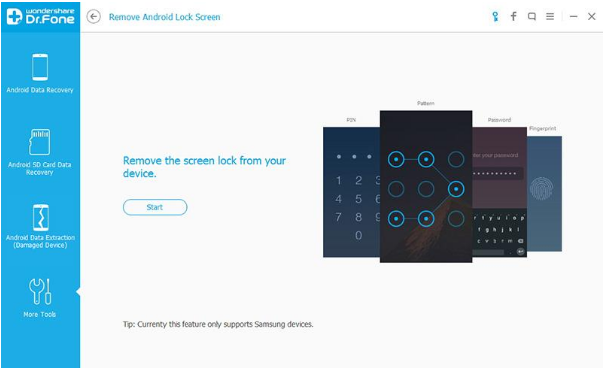
To get started with Dr. Fone, launch Wondershare’s Dr.Fone for Android software. Once done, go to the ‘More Tools’ section in the software. From here, choose the option of ‘Android Lock Screen Removal’ from the three options provided under ‘More Tools.’ This will allow you to remove passcode, PIN, fingerprint and pattern from your Samsung phone.
remove-android-lock-screen
As said above, Wondershare Dr.Fone can remove all types of Android smartphone screen locks, including password, PIN, pattern, and fingerprint. Then, connect the Android mobile device and click on the ‘Start’ button to begin.

Step 2: Enter the download mode on your Android device

In order to get to the download mode in your Android device, follow the instructions below, which are also provided in the program.
1. Turn off your Android smartphone.
2. Hold the power button, the home button, and the volume down button simultaneously.
3. Press the button of the “Volume Up.”

Step 3: Download the recovery package

After you have entered into the download mode on your Android device, your smartphone will start downloading the recovery package subsequently. Wait until the download completes.

Step 4: Remove Android lock screen without losing your data

Once the download is complete, the Android lock screen removal process will start. While the Dr. Fone software works, none of your data on your Android smartphone will be affected. After the whole process is over, you can access your Android mobile device without entering any passcode/pin/pattern and access all your smartphone data without any problem.

Congratulations, if you have followed these procedures, you have successfully unlocked your Samsung Galaxy Android smartphone effectively without having to go through any of the phone lock mechanisms. As you can see,  Wondershare Dr. Fone is an awesome piece of software which helps you get your Samsung smartphones up and running with passcodes/pin. s

Source: TechWorm

Sunday, 25 September 2016

10 best Android Apps which are not available on Google Play Store


10 best Android Apps which you should have on your smartphone but are not available on Google Play

As you may already know, there are more than a million Android apps on Google Play which cater to your different needs. But there are some great apps which you should have on your Android smartphone because they are not available on Google Play. The reasons for this are various, prominent among them is that most of them violate Google’s terms. If you are one of those who loves to experiment,  you can always grab APK files for these Apps and install them on your smartphone.
These apps are easy to install, so long as you know where to find them. Remember that in most cases you won’t be alerted when they are updated, so it’s a good idea to check back with the download location from time to time to ensure you’re always running the latest version. Also to install these APKs on your Android smartphone/tablet, be sure to enable Install from Unknown Sources from Settings.

#1 VideoMix

15 Amazing Android Apps You Wouldn’t Find on Google Play Store
This is the best App that will let you stream videos, TV shows and lots more for free of cost. Also, there will be no need to sign up or register in this App, just open the app search for your favorite movies and start streaming.

#2 Blackmart Alpha

15 Amazing Android Apps You Wouldn’t Find on Google Play Store
Blackmart Alpha is known as the most popular alternative to Google Play Store. Blackmart Alpha is well known its black market store which will offer you a host of cool apps for free of cost. Those Apps that are normally paid Apps on Google Play are available for free on Blackmart Alpha.

#3 Lucky Patcher [root]

15 Amazing Android Apps You Wouldn’t Find on Google Play Store
Lucky Patcher is an App that allows you to modify other Android apps in various ways. You’ll need a rooted device to harness all the features of Lucky Patcher. You can run several actions with this App such as removing license verification for premium apps, modifying APK files, and backing up/restoring apps. It’s better to make a full backup of your Apps and data before using this App as it can possibly lead to loss of data.
not-on-google-play-tubemate
TubeMate is a very popular YouTube downloader app which is obviously not allowed on the Play Store due to Google restrictions. It also supports downloading video from other websites such as Facebook, Vimeo, and DailyMotion among others. While the interface is a little clunky and riddled with ads, it works very well for what it’s worth and allows you to download videos in a variety of formats and resolutions.
You are advised to download the APK for Tubemate only for the above link, as there are a lot of fake, infected TubeMate APKs available online. Another alternative to TubeMate is Videoder which has an attractive interface but slower download speeds.
not-on-google-play-mixplorer
MiXPlorer is one of the best Android file managers out there with a very neat user interface and plenty of features that should appeal to both casual and power users alike. For one, it offers tab support and a dual panel mode on big screens which helps if you’re working with several folders at once. You can also access your cloud files with up to seventeen services to select from including all the popular ones such as Google Drive, Dropbox, MEGA, andOnedrive.
MiXPlorer also supports root access for advanced operations, advanced search functions, and a very customisable user interface. Overall, it’s a very well-rounded file manager you can get for free that doesn’t have ads.
not-on-google-play-F-droid
F-droid is the market for free and open-source Android software. Downloading the F-droid client makes it easy for you to search for and install open-source apps, and it also helps you keep track of updates on your device. It’s highly recommended for open-source enthusiasts.

#8 Amazon App Store

15 Amazing Android Apps You Wouldn’t Find on Google Play Store
The giant shopping network has their own App store where you can find a huge collection of free apps that you may not get in the Google Play store that is why it is also known as the best alternative to Google Play Store. You can also download Amazon Underground from Amazon App store. This app gives you all the usual shopping features along with access to the Amazon Appstore. More importantly, it includes Underground Apps, a selection of $20,000 worth of apps, games, and in-app purchases available for free.
not-on-google-play-popcorn-time
Popcorn Time allows you to watch movies and TV Shows on your Android device either by streaming or downloading to watch offline. There are literally thousands of high-quality movies here, and you can either search for specific titles or browse the available collections.
not-on-google-play-xposed-framework
Installing a custom ROM is one way to modify your Android device, but you don’t really need to do so if you just want to modify a few things here and there. The XPosed Framework allows you to modify your existing system without going through the hassle of installing a custom ROM. It is for root-level users only, and there is a wide range of mods and tweaks that can be applied to your device, but be careful. Do backup your data before using the Xposed Framework or its components.

Source: Techworm

Friday, 23 September 2016

Logitech Harmony Home Control


Do yourself a favor and throw your basic $4 universal remote in the garbage can — that’s not a man-approved remote control, sorry. And, let’s face it, you lose it all too often anyway. One cool gadget you need in your life is a Logitech Harmony Home Control, a universal smart remote and base that allows you to use your smartphone as a remote as well. The device not only works with the majority of your entertainment devices, but also your home automation devices like Philips Hue or Nest Learning Thermostat (so you can lower the lights or change the temperature without even leaving your seat). The Logitech Harmony Home control works with over 270,000 devices, including TVs, satellite and cable boxes, blu-ray players, Apple TV, Roku, Sonos, Xbox, Philips Hue and more. So if you want to control the world around you without having to get up, pick up the Logitech Harmony Home Control — you’ll feel like a wizard!
Price: $149.99
Source: Heavy Gadgets

Thursday, 22 September 2016

LinkedIn launches new app to help students to find a job


LinkedIn is business-oriented social networking server which helps students to get their dream job. The company has launched new tool in the form of an Android and iOS application for students.
According to AdaYu senior product manager at LinkedIn said that, “It was only natural for us to try to come up with a solution for this but do it in a way that really resonates with students and meet them where they are, which is mainly on the mobile phone.”
In a blog post LinkedIn says that, “So how can the new app help you tackle your college to career transition? Think of it as your personal job exploration guide, providing tailored jobs related recommendations based on real data from the career paths of hundreds of millions of successful professionals.”
LinkedIn database report shows that more than 400 million acquired users in more than 200 countries and territories in 2015.
LinkedIn Students will help you explore new career paths and tackle your job search. You can get new personalized recommendations every day so that you can easily stay ahead in your post-college job search.
List of new features from LinkedIn Students apps:
  • Explore suggested roles based on your education to uncover unexpected opportunities
  • Get hand-picked career advice articles written just for students
  • View the profiles of recent alumni with your major to see their career path and get advice
  • See the companies that regularly hire students from your school
  • Get job listings appropriate for your major and year

Download it today for iOS and Android phones.

Google Search Slides Into Your Chat With the Allo App

Always there to help, but always listening.


Google wants to add a middleman to your mobile chats — a personal virtual assistant who's not shy about interjecting itself into the conversation.

The new Allo app promises to be "smart," sort of. Its Google Assistant will butt in with restaurant recommendations when someone types, "Want to get sushi?" It can also send daily updates on weather and sports or suggest replies to your friends' messages.

The idea is to keep the conversation flowing, so you don't have to constantly leave Allo to look up something else.

Google is releasing the free chat app Wednesday, just a week after Apple updated its own Messages app with the a href='https://www.apnews.com/211b2659758546bd90efd689408... 10 software update/a. Messages works on iPhones and iPads, while Allo will work for iPhones and Android phones, but not tablets.

Do you really need another chat app? Here's more on Allo to help you decide.

SMART REPLIES

Allo can help cut down on typing on small screens by suggesting replies based on context. If a friend asks how you're doing, you can tap "Good tnx." Allo preserves chatting shortcuts such as "u'' for "you." Apple offers something similar on its smartwatch, but not phones or tablets. Allo will also analyze photos to suggest replies such as "beautiful smile" or "the skyline looks great!" — at least for photos with smiles or skylines. Remember that this is software, so its suggestions won't always make sense.

Of course, you're free to type your own response. Sending a computer-generated reply to a friend can feel, well, deceptive. Worse, it might make your friend wonder if your response is genuine. And having the suggestions appear in oval bubbles in the chat can make it seem as though a stranger has joined the chat (though you can shut out Google by enabling incognito mode).

PERSONAL ASSISTANT

When you're chatting with someone, you're often making plans. Google Assistant can retrieve information on nearby restaurants, movie times and even the weather. Everyone in the chat will see the Assistant's replies and can weigh in on the choices.

In some cases, Google Assistant will even anticipate your needs, such as when someone's asking about getting sushi. An oval bubble appears with an offer to retrieve nearby sushi restaurants. After choosing one, you can tap for opening hours, directions or the menu.

Reservations aren't available yet, though Google is considering third-party integrations such as OpenTable for dinner and Airbnb for accommodations. Apple's Messages doesn't invoke the Siri virtual assistant the same way, but it already offers integration with third-party apps so that you can make plans (and reservations) while chatting.

Beyond planning, Google Assistant can give you the latest news and sports scores, translate phrases or do math calculations. Asking for directions will bring up Google Maps.

LIMITED SMARTS

The app's intelligence still feels, well, limited. Though Google Assistant is an evolution of the Google Now feature that has long been on phones, it doesn't do as much as Google Now in terms of identifying patterns or checking other Google services.

For instance, if a friend asks you when your flight leaves, Allo won't try to suggest a reply, even though Google has your calendar. Likewise, Google Assistant won't automatically offer traffic conditions or transit schedules for your regular commute the way Google Now does.

You can request daily updates on the weather, news and sports. But you can't get automatic updates whenever the score changes or a game ends.

Google calls its Assistant a preview. Following its debut on Allo, it will arrive on a smart speaker called Google Home this fall.

EXPRESSIONS

Plain text is boring, so Allo features a slider that can make your messages and emojis larger or smaller. You can send one of hundreds of virtual stickers specifically designed for Allo.

Apple's Messages app has a variation on this. You can make a message "loud," such that the chat bubble briefly gets larger. Or make it "gentle" and appear in small text. Sticker packs are also available through a new app store within Messages.

One problem with both of these apps is that your friends need to be using the same app to see the desired effect. Google will send text messages to non-Allo friends, but without the special effects. Apple Messages will add notations such as "sent with Loud Effect" to those on Android or older versions of Messages.

TOO MANY APPS?

Beyond making its Assistant smarter, Google will need to persuade people they need yet another chat app, something that could be tough given that Google already offers four of them.

Google's Hangouts text and video calling service will be targeted at business users. Allo is the consumer offering, but won't offer video calling. That's where the Duo app comes in. And while Allo accounts are based on your phone number, not your Google ID, you can't use Allo to receive regular texts. On Android, Google has Messenger for that.

Go Get a Replacement For Your Exploding Samsung Note 7


Replacements are now available for Samsung's recalled, exploding phone.


Samsung says new Galaxy Note 7 smartphones will be available in U.S. stores starting Wednesday to replace about 1 million devices that are being recalled because their batteries can catch fire.

The South Korean company has been scrambling to fix problems caused by faulty batteries in the latest version of its top-of-the-line smartphone, which first went on sale last month.

When it first offered on Sept. 2 to replace the affected Note 7 phones, Samsung said it would swap them for models of its other phones, such as the Galaxy S7, until supplies of replacement Note 7 devices became available.

Samsung followed up last week by announcing that U.S. consumers who had purchased one of the recalled phones could choose between a replacement or a refund for the device, which sells for about $850. That offer wasjointly announced with officials at the U.S. Consumer Product Safety Commission after Samsung was criticized for not coordinating more closely with the commission.

Safety officials have urged Note 7 owners to turn off their phones and return them immediately. They cited reports of Note 7 batteries overheating in the United States, including 26 instances where individuals were burned and 55 that caused property damage.

The problem doesn't affect all Note 7 phones, because Samsung uses batteries from different suppliers. But the company has said about 2.5 million devices may be affected worldwide, including 1 million sold in the United States.

Samsung also said it's pushing out two software updates through wireless carriers. One will show a green battery icon to confirm that a Note 7 device is a new one that doesn't have the battery problem. The other will display a short notice to owners of older phones covered by the recall, telling them to turn off their device and take it in for a replacement.

About a quarter of affected phones had been exchanged in the United States by Tuesday, according to a spokeswoman for Samsung's U.S. subsidiary. She was unable to say how many Note 7 buyers sought refunds, but said "the vast majority" received a different Samsung phone as a replacement.

Fitness Trackers Don't Improve Weight Loss, Study Says Say it ain't so.


Like a good pair of sneakers, fitness trackers have long been considered a worthy investment for anyone trying to shape up. Unfortunately, a new study has found that wearing one might not help much for weight loss–in fact, it could hinder your results.
In a new paper for the Journal of the American Medical Association, researchers from the University of Pittsburgh spent two years observing 470 overweight or obese subjects between 18 and 35 years old and put them on a low-calorie diet with instructions to increase physical activity to 100 to 300 minutes a week. After keeping food and exercise diaries and attending counseling sessions, everyone lost weight.
After six months, half of the participants were assigned to monitor diet and activity online while the other half were assigned a fitness tracker (a BodyMedia Fit Core armband, which is worn on the upper arm and not the wrist like most trackers).
350 people (or 75 percent of the original group) completed the two years. Those without a tracker lost an average of 13 pounds (going from 210 to 197 on average) while those using a tracker for 18 months lost an average of 7.7 pounds (going from 212.3 to 204.5). The paper's lead author, John Jakicic, Ph.D. explained in a release that using trackers "may give people somewhat of a false sense of security that they don't pay attention to some of the key behaviors that they otherwise might pay attention to. They are relying on the device or the technology a little bit too much and that may be why we saw a little bit less weight loss in that group."
Considering the study's limitations–participants didn't start tracking activity until six months in, it was exclusive to overweight/obese subjects–this isn't a definitive call to stop using fitness trackers. Your FitBit may not be the key to dropping pounds, but if it motivates you to exercise, by all means, keep counting those steps.

Sunday, 17 July 2016

Nokia P1 Android smartphone: All That’s Known About the Nokia’s Secret Upcoming Phone

Nokia's Secret P1 Android Smartphone In Making, Leaks Confirm

Nokia P1 Android smartphone, will it be tough like Nokia 3310?

The yesteryear's smartphone king, Nokia was in News recently for its upcoming Android smartphone, Nokia P1.  We all know Nokia for its tough and rugged mobiles like 3310 and Express Music and judging by the interest shown in Nokia P1, people are awaiting the Finnish smartphone maker’s Android foray eagerly.
Once, the largest mobile phone seller by a distance, Nokia fell to the wayside after the emergence of Android smartphones and iPhone. Nokia’s inability to  adapt to Android and the lack of success for its S60 operating system meant that it was a ripe takeover candidate. And that it what happened in 2014 when Microsoft bought Nokia’s mobile business for a whopping $7.6 billion.
What happened after that is a true sob story. Like a true corporate raider, Microsoft stripped Nokia smartphones of its iconic label and renamed them Lumia smartphones. It further stripped Nokia’s patents and used them for its own gains. When nothing was left to salvage, Microsoft took a $7.6 billion writedown on its balance sheets last year and forgot about Nokia.
But apparently, those who remember Nokia’s tough and rugged smartphones and the erstwhile Nokia fanboys club did not. As soon as the Nokia P1 press renders hit the News, there was a dizzy search for images and news about Nokia’s upcoming Android smartphone. Our readers also joined the fray and shot in hundreds of emails to us asking details about Nokia P1. Here is our attempt to tell you all that we know about Nokia Android smartphone.

All about Nokia’s Android smartphone

Nokia is returning to smartphone production in collaboration with the Chinese smartphone manufacturer, Foxconn. The Nokia-Foxconn deal was announced in May 2016 through which Foxconn will manufactureNokia’s Android smartphones. Foxconn also purchased Sharp a few months ago, which may give an explanation as to why the image could be the same as the Sharp Aquos 1. It looks  like Sharp Aquos P1 will be re-branded as the Nokia P1 for launch in Europe in October but there is no verifiable news about this.

Nokia P1 Specifications

Nokia P1 Android smartphone will have the same set of specs as Sharp Aquos 1. According to reports, Nokia P1 will have a 5.3-inch FHD resolution IGZO panel for display. It will be powered by the latest Snapdragon 820 processor running on 3GB RAM and will have 32GB of expandable storage. The Nokia’s first foray into Android smartphones will carry its signature big camera and feature a 22.6MP primary camera with an f/1.9 aperture. The whole setup will be powered by a solid  3,000mAh battery. Nokia P1 will have IP58 dust-proof body of water repellent and fast-charge support.
The Nokia P1 Android smartphone make a mouthwatering spec list for Android smartphone buyers. Given Nokia’s history we can expect a rugged and tough smartphone which can withstand the everyday fall, grime, dust and the coffee spills our current Android smartphones aren’t capable of enduring. The only smartphone that comes close to withstanding our day to day assault is the Moto X Android smartphone, but that smartphone hasn’s clicked the way it should have.
It is however requested to take the above news with a pinch of salt because this is not the first time when the Nokia Android smartphone has been leaked. Earlier, there was news of Nokia C1 coming in both variants Android and Windows which ultimately proved to be false. Even the ever reliable GSMArena brought out a specifications list for Nokia C1 only to disappoint. If you are planning to buy a new Android smartphone in the upcoming holiday season, it will do you a world of good to wait till Nokia P1 Android smartphone is launched. Be assured, once Nokia P1 comes to the market, it won’t disappoint you.

Source http://http://www.techworm.net/2016/07/nokia-p1-android-smartphone-known-nokia-secret-upcoming-phone.html